
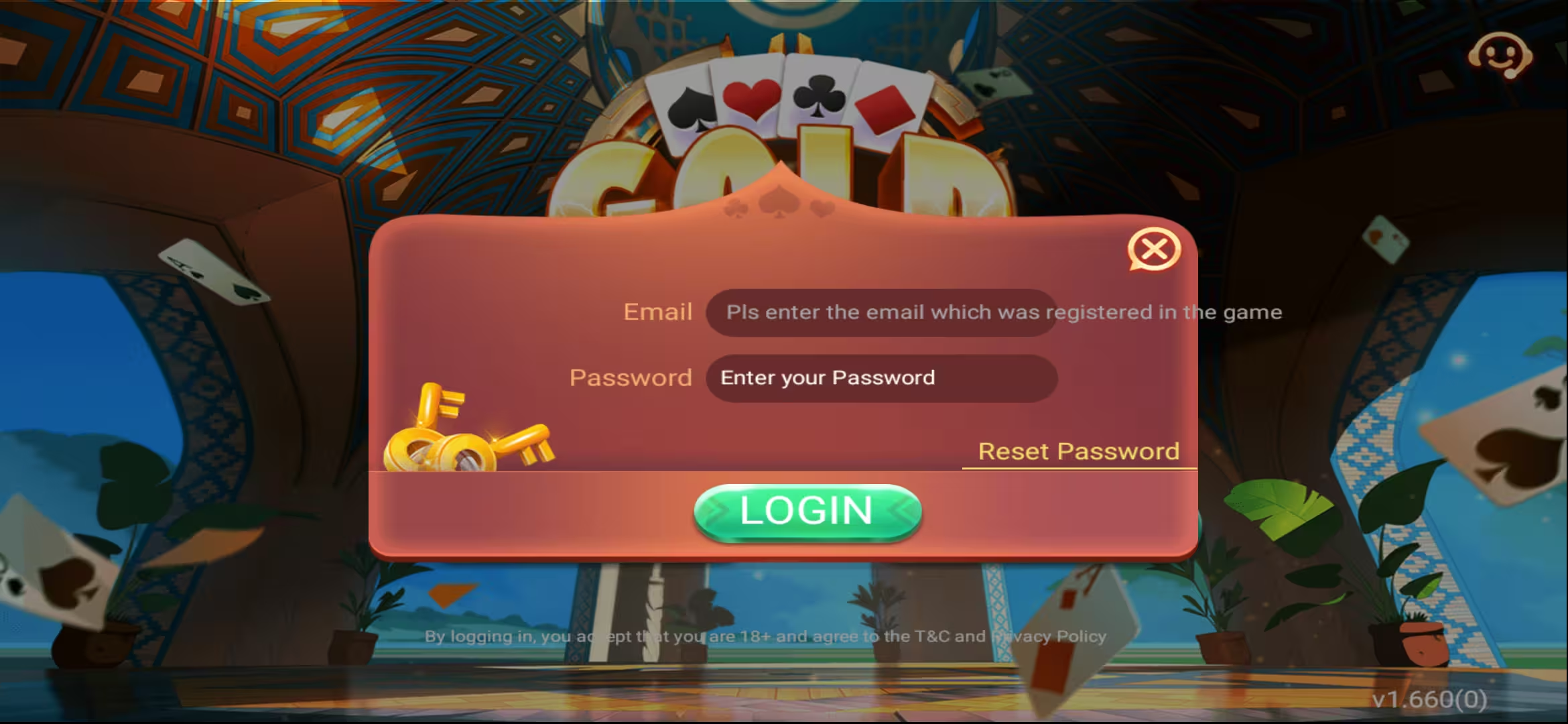
Need a clear Teen Patti Gold login path—or a fresh sign up and registration flow? This guide covers both. You’ll learn how new players register with a mobile number and OTP, how returning players log in, how to reset a forgotten password, and how to fix the most common login errors on Android in Pakistan.
Login vs Sign Up: Which Do You Need?
Sign up / registration is for first-time players who do not have an account yet. You enter a mobile number, verify with OTP, set a password, and create your profile.
Login is for returning players. You open the app, enter the same mobile number and password, and enter the lobby. If you already registered, do not try to sign up again with the same number—use login instead.
Before either path, install a trusted APK from our download page or follow the install guide. Using the latest build such as v1.660.0 reduces login glitches caused by outdated packages.

Teen Patti Gold Sign Up & Registration (Step-by-Step)
New to the game? Complete registration once, then use login every day after. For a deeper security and email-binding walkthrough, also see our account creation guide.
Open the app
Launch Teen Patti Gold on your Android phone. Wait for the welcome or login screen to load fully on a stable connection.
Tap Sign Up / Register
Choose Sign Up or Register—not Login—if this is your first account. Returning players should skip to the login section below.
Enter your mobile number
Use an active Pakistani mobile number you can access for OTP. Double-check digits before requesting the code.
Verify with OTP
Enter the one-time password sent by SMS. Never share OTP with anyone claiming to be support.
Create a strong password
Use at least 8 characters with letters and numbers. Save it somewhere private—you will need it for every Teen Patti Gold login after this.
Finish profile details
Complete any remaining fields (username, optional email). Binding email later helps password recovery. Then enter the lobby and explore bonuses in our rewards guide.
Teen Patti Gold Login Guide (Returning Players)
Once registered, daily access is simple. Keep the same number and password you used at sign up.
Launch Teen Patti Gold
Open the installed app. If the lobby does not appear automatically, you will see the login form.
Enter mobile number and password
Type the registered number exactly (country format as shown in the app) and your password. Avoid autofill from a wrong older account if you manage multiple games on one phone.
Tap Login
Wait for the lobby to load. On first login after a reinstall, the app may take a few extra seconds to sync balance and VIP status.
Confirm you are in the right account
Check your username, chips, and ID in the top bar. If something looks wrong, log out and try again—do not recharge until you confirm the account.

Forgot Password? Reset Your Teen Patti Gold Login
If login fails because you forgot the password, use the in-app recovery option instead of creating a second account.
1. Tap Forgot Password
On the login screen, open Forgot Password or a similar reset link.
2. Verify with OTP or email
Confirm ownership with the OTP sent to your registered mobile number. If you bound an email earlier, email recovery may also be available.
3. Set a new password and log in
Create a new strong password, return to the login screen, and sign in with the same mobile number.
Still stuck? Re-read the security tips in the account guide and make sure you are not typing a space or wrong country code.
Common Teen Patti Gold Login Problems (and Fixes)
Retype credentials carefully. If the number already belongs to an account, use Login—not Sign Up. Reset the password if you are unsure.
Check signal, wait 60–90 seconds, and request a resend. Confirm the number is correct. Disable VPN temporarily if SMS is delayed.
Switch to Wi‑Fi, force-close the app, and reopen. Update to the latest APK if you are on an old build. Clearing cache (not full data) can help if you still remember your password.
That mobile number is already registered. Go back and use Teen Patti Gold login instead of creating a new account.
Confirm the username and player ID. You may have signed into a different account. Do not deposit until the profile matches. For cash-out later, use the withdrawal guide.
Keep Your Login Secure
Never share OTP or password
Real support will not ask for your password, OTP, or PIN on WhatsApp or SMS.
Bind email when available
Email binding improves recovery if you lose SIM access later.
Use one main account
Keep VIP progress, bonuses, and withdrawals on a single registered number.
Download from trusted sources only
Fake APKs can steal login credentials. Stick to verified download links from this site.
After You Log In: Smart Next Steps
Once inside the lobby, claim any daily rewards, review promotions, and only then decide whether to play or recharge. If you are evaluating VIP, read the VIP Pass guide before buying.
New players should learn table basics on low stakes and set a personal budget. Adult players only (18+). Real-money gaming involves risk—login access does not change that.
Logging In on a New Phone or After Reinstall
Switching devices is common in Pakistan when players upgrade phones or reinstall the APK. Your chips and account live on the server—not only on the old handset—so a clean Teen Patti Gold login restores access when credentials are correct.
Install the latest trusted APK first, open the app, and choose Login (not Sign Up). Enter the same mobile number and password from the old device. After you reach the lobby, confirm your player ID matches what you remember from before. If you used VIP or pending withdrawals, check those screens before you play high stakes.
If the old phone still has the app open, log out there after the new device works. Running two active sessions can interrupt tables mid-hand. Keep a written copy of your number and a password you can recall without screenshots stored in shared chats.
Reinstalling after a wipe follows the same path. Do not create a second registration with a different SIM “just to check”—that creates a separate empty account and confusion later when you try to withdraw.
Sign Up Mistakes That Block Login Later
Many login headaches start at registration. Avoid these patterns so your future Teen Patti Gold login stays simple.
Using a temporary or borrowed number
If you lose access to that SIM, OTP recovery becomes hard. Register with a number you control long term.
Password you cannot remember
A password you typed once and forgot forces resets every week. Choose something strong but memorable, or store it in a secure password manager—not a public note.
Skipping email bind forever
You can play after sign up without email, but binding later adds a recovery path if SMS fails. Do it when the lobby is quiet—not during a rush to join a table.
Registering on a shady APK
Modified apps can harvest login details. Always start from a verified download, then complete sign up or login only inside that install.
Quick Checklist Before Every Login Session
• Stable internet (Wi‑Fi preferred if mobile data is unstable)
• Correct app icon from your trusted install—not a lookalike clone
• Correct mobile number and password ready
• No one watching your screen when you type credentials in public
• After login: claim due bonuses, then play within your budget
• If withdrawing later the same day, keep your JazzCash / Easypaisa details accurate per the withdrawal guide
Frequently Asked Questions
Open the app, enter your registered mobile number and password, then tap Login. Wait for the lobby to load and confirm your profile details.
Tap Sign Up / Register, enter your mobile number, verify OTP, create a password, and finish profile details. Then use login for every future session.
Yes—install the app on the second device and log in with the same mobile number and password. Avoid running conflicting sessions that may kick you out mid-game.
If you can no longer receive OTP on the old number, contact in-app support with account proof. Binding email earlier makes recovery easier.
Yes. Creating an account and logging in is free. Deposits and optional purchases like VIP are separate choices.
Use the official download page on this website so you are not entering credentials into a modified APK.
Teen Patti Gold login is straightforward once your account exists: mobile number, password, enter lobby. New players start with sign up and registration—OTP verification, strong password, then the same login habit every day. When something fails, reset the password or fix connection and app version issues before creating a duplicate account.
For more depth on securing your profile, read How to Create an Account in Teen Patti Gold. Explore the full app on the Teen Patti Gold homepage.
Ready to get in? Download Teen Patti Gold, sign up or log in, and play responsibly—18+ only.
Related Articles
Related Teen Patti Gold hubs

Teen Patti Gold APK v1.660.0 is here. Learn what’s improved in this update, why you should upgrade, and how to safely update or reinstall the APK on Android. Includes file info, safety tips, troubleshooting, and FAQs for Pakistani players.

Complete step-by-step guide to download and install Teen Patti Gold Pakistan APK v1.660.0 for Android. Learn why it's not on Play Store, safety tips, installation process, and how to play safely in Pakistan. Includes comparison with Indian version and security best practices.

Complete comparison guide between Teen Patti Gold Pakistani and Indian versions. Learn about availability differences, payment methods, installation processes, and which version is right for you. Understand Play Store vs APK differences and regional features.